Onboarding Flow Diagrams for Product Teams
Discover how to design better user experiences by mapping out onboarding flow diagrams that your entire product team can understand and improve together.
· 6 min read
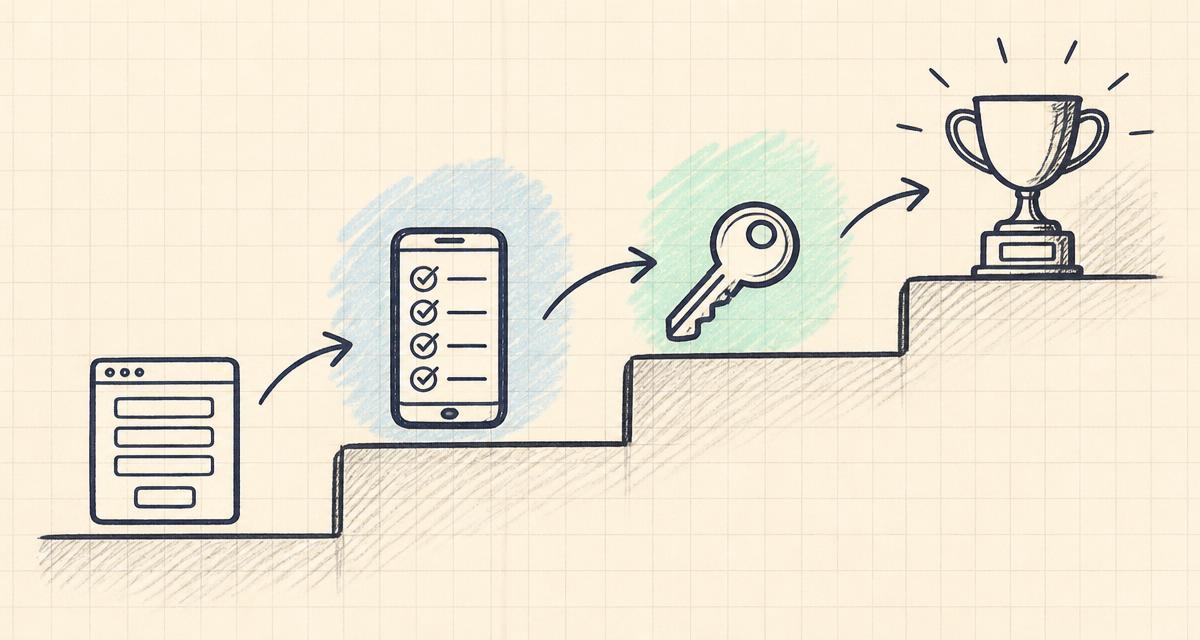
Designing a seamless user journey is difficult when the steps only exist in your head or in a messy spreadsheet. Product teams often struggle to spot friction points in the initial user experience until customers start dropping off. Mapping out onboarding flow diagrams helps you visualise every interaction, from the first sign-up click to the final 'aha' moment.
The Importance of Visualising User Onboarding
Onboarding is the most critical phase of the user lifecycle. It is where you prove your product's value. If a user gets lost during the setup, they are unlikely to return. A visual diagram acts as a single source of truth for your product managers, designers and engineers. It ensures everyone understands the logic behind every prompt and email.
By laying out the flow on a digital canvas, you can see the complexity that might be hidden in code. You might realise that a three-step process actually involves seven different decisions for the user. Visualisation makes these hurdles obvious so you can remove them before they affect your retention metrics.
Essential Components of an Onboarding Diagram
Every effective onboarding flow needs a few core elements to be useful. Without these, your diagram is just a collection of boxes rather than a functional map.
Entry Points
Start by identifying where users come from. Are they clicking a link in a marketing email, coming from a social media ad, or signing up directly from your homepage? Each entry point might require a slightly different onboarding experience.
The Critical Path
This is the shortest route a user can take to reach their first success. In Sketchboard AI, you can use the shapes library to mark these essential steps clearly. Avoid adding side-quests or optional tours to this path; keep it lean and focused on value.
Friction Points and Decision Nodes
Use diamonds or specific symbols to represent choices. Does the user need to verify their email? Do they need to invite a teammate? These are friction points where users might pause. Mapping them helps you decide if they are truly necessary at that moment.
Steps to Build Your First Flow
If you are starting from scratch, follow this sequence to ensure your diagram remains clear and actionable.
- Define the Success State: Decide exactly what action constitutes a 'successful' onboarding. This could be creating a first project or reaching a specific dashboard.
- List Every Screen: Write down every page the user must visit. Do not forget error states and loading screens.
- Map the Happy Path: Connect the screens in the ideal order. Use snapping arrows with elbow routing to keep the lines tidy and professional.
- Add Edge Cases: What happens if the user denies permissions? What if their payment fails? Map these branches out separately.
- Review as a Team: Use real-time collaboration to walk through the flow with your developers. They will often spot technical constraints you might have missed.
Onboarding Flow Checklist
Use this checklist to audit your diagram once you have finished the first draft.
| Feature | Purpose | Checked |
|---|---|---|
| Sign-up Method | Social login vs email | [ ] |
| Value Proposition | Showing the core benefit early | [ ] |
| Data Input | Minimising required fields | [ ] |
| Progress Indicators | Letting users know how far they have left | [ ] |
| Success Milestone | Confirming the user finished the setup | [ ] |
| Re-engagement | Email or push triggers for drop-offs | [ ] |
Using Visual Style to Communicate Better
A dry, technical flowchart can sometimes be intimidating for non-technical stakeholders. Using a hand-drawn style can make the planning process feel more creative and less rigid. Sketchboard AI offers a library of 1,000 hand-drawn marker illustrations that help you represent user personas, mobile devices or cloud services without needing a graphic designer.
You can also use the dedicated Washes picker. Applying one of the 9 marker-scribble patches to a group of elements is a great way to highlight a specific phase of the onboarding, such as 'The Registration Phase' versus 'The Personalisation Phase'. This visual grouping makes large, complex diagrams much easier to digest during a presentation.
Common Mistakes in Onboarding Design
- Asking for too much too soon: Do not demand a credit card or a full profile bio before the user has seen the product in action.
- Ignoring the 'Empty State': A diagram should show what the product looks like when there is no data yet. If your onboarding leads to a blank screen, it feels like a dead end.
- Overwhelming with Tooltips: Too many pop-ups at once will lead to 'skip-clicking'. Map out the timing of your tips so they appear only when relevant.
- Lack of Exit Ramps: Users should be able to skip parts of the onboarding if they are already familiar with similar tools.
- Messy Diagram Routing: If your arrows cross each other constantly, the logic becomes hard to follow. Use tools with arrow-to-arrow anchors to keep things organised.
Collaboration and Feedback
Product onboarding is never 'finished'. As you add features, the flow must evolve. Hosting your diagrams in a space that allows for real-time team collaboration is vital. When a developer notices a logic gap, they should be able to add a text box with rounded corners and a border to leave a note directly on the flow.
Once the flow is agreed upon, use the present mode with autoplay to walk stakeholders through the journey. This helps them experience the sequence as a user would, rather than just looking at a static map. You can then export the final version to PDF or PPTX to include in your product requirements documentation.
FAQ
How detailed should an onboarding diagram be?
It should be detailed enough that a developer could build the logic from it, but simple enough that a new stakeholder can understand the user's goal within thirty seconds of looking at it.
What is the difference between a user flow and an onboarding flow?
A user flow covers the entire lifecycle of a user within the app. An onboarding flow is a specific subset focused purely on the first-time experience and the path to initial value.
Can we use AI to help build these diagrams?
Yes, Sketchboard AI allows you to generate new illustrations or symbols in the same hand-drawn style. If you need a specific symbol for a niche industry that isn't in the standard library, you can generate it to keep your diagram consistent.
Try it on your next deck
Ready to clear the clutter and design a better experience for your users? Start a free deck on Sketchboard AI today to access 100 illustrations and 100 symbols for your first three slides. Map out your onboarding flow and see how much easier it is to build when everyone is on the same page.
- product management
- user experience
- onboarding flow
- diagramming
- ux design